Brother XR9550 Sewing and Quilting Machine Review: Worth It? (November 2026)
The Brother XR9550 suits home sewers who want many stitch choices and quilting accessories in one computerized machine. Its 165 built-in stitches, LCD screen, wide table and 8 included feet make it a strong fit for varied projects.
On this page (9 sections)
- What does the Brother XR9550 offer?
- How do the XR9550, CS7000X and CS7205 compare?
- Which Brother machine fits your sewing plans?
- How should you set up the XR9550 for a first project?
- What mistakes can make sewing harder?
- How do the XR9550’s accessories support sewing and quilting?
- How should you care for and store the XR9550?
- What are the XR9550’s main trade-offs?
- Is the Brother XR9550 the right choice for you?
The Brother XR9550 is a computerized sewing and quilting machine for home sewers who want a wide stitch menu and useful project accessories. It has 165 built-in stitches, an LCD display, a wide table and 8 sewing and quilting feet.
That mix suits garment sewing, decorative details and larger projects such as quilts. If you mainly mend hems or sew simple seams, a less complex machine may be a better match.
What does the Brother XR9550 offer?
The Brother XR9550 combines 165 built-in stitches with push-button selection on an LCD screen. The menu includes utility, decorative and heirloom stitches, 8 auto-size buttonhole styles and 55 alphanumeric stitches.
Brother XR9550: Best for stitch variety

- 165 built-in stitches
- 8 auto-size buttonhole styles
- LCD stitch selection
- Wide table and 8 sewing and quilting feet
A computerized machine with a large stitch selection, LCD controls, a wide table and accessories for sewing and quilting. Its 120-volt US-only use is an important limit if you live elsewhere.
Pros
- 165 built-in stitches
- Automatic needle threader and drop-in top bobbin
- Wide table and protective hard cover included
- Free Brother technical support for the life of the machine
Cons
- Large stitch menu may be more than a basic mender needs
- Intended for use in the US at 120 volts
An automatic needle threader and drop-in top bobbin simplify two routine setup steps. The wide table gives larger work more support beside the needle, while the protective hard cover helps shield the machine during storage or transport.
The included presser feet cover several tasks, including zippers, buttonholes, button sewing, blind hems, overcasting, monogramming and quilting. A foot suited to the fabric and seam helps it move smoothly under the needle.
Who should choose the Brother XR9550?
Choose the Brother XR9550 if you expect to use more than basic straight and zigzag stitches, want lettering for simple monogramming, or plan to sew projects that benefit from a wide table. Its LCD selection helps you choose among its many stitch options without relying on a dial alone.
It can also suit a newer sewer who wants room to try decorative work as skills grow. The automatic threader and drop-in bobbin make setup less fiddly, though learning which stitches and feet fit each project still takes practice.
Skip it if you mainly need a dependable tool for quick repairs and rarely use decorative stitches. A simpler machine may be easier to navigate, and you can compare other options in our guide to Brother sewing machines for beginners.
How do the XR9550, CS7000X and CS7205 compare?
The CS7000X has the highest score, the XR9550 has the largest stitch count, and the CS7205 includes one alphanumeric font. All three have computerized controls, an LCD screen and a wide table.
| Feature | Brother CS7000X | Brother XR9550 | Brother CS7205 |
|---|---|---|---|
| Built-in stitches | 70 | 165, including 55 alphanumeric | 150, including 1 font |
| Buttonhole styles | 7 one-step | 8 auto-size | 8 one-step |
| Included feet | 10 sewing feet plus quilt guide | 8 sewing and quilting feet | 11 sewing feet plus quilt guide |
| Wide table | Included | Included | Included |
| Needle threader | Automatic | Automatic | Automatic |
| Power use | US, 120 volts | US, 120 volts | US, 120 volts |
The CS7000X is a sensible choice if you value a smaller stitch menu, a metal frame and fixed needle bar, and a larger included set of sewing feet. Its 70 stitches still cover utility, decorative, heirloom and quilting work.
The CS7205 may suit you if its single alphanumeric font and 11 included feet match your plans. For help deciding which accessories matter, see our guide to sewing machine presser feet.
Which Brother machine fits your sewing plans?
The CS7000X suits people who want quilting support and a useful set of feet without the XR9550’s extensive stitch menu. It includes a quilt guide, wide table and hard case.
Brother CS7000X: Best for straightforward quilting
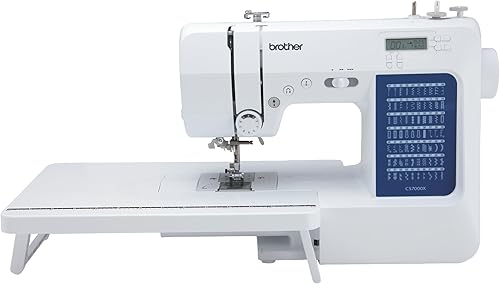
- 70 built-in stitches
- 7 one-step buttonholes
- 10 sewing feet and quilt guide
- Wide table and hard case
A lower-stitch-count alternative with a metal frame, fixed needle bar and 10 sewing feet. It still includes a wide table and hard case for quilting projects.
Pros
- 10 sewing feet plus a quilt guide
- Fixed needle bar and metal frame
- Wide table and hard case included
Cons
- Fewer built-in stitches than the XR9550
- Intended for use in the US at 120 volts
The XR9550 suits sewers who will use its lettering, buttonhole and decorative options. Its stitch count gives you more choices, but those choices add value only when your projects call for them.
Brother XR9550: Best for stitch variety
- 165 built-in stitches
- 8 auto-size buttonhole styles
- LCD stitch selection
- Wide table and 8 sewing and quilting feet
A computerized machine with a large stitch selection, LCD controls, a wide table and accessories for sewing and quilting. Its 120-volt US-only use is an important limit if you live elsewhere.
Pros
- 165 built-in stitches
- Automatic needle threader and drop-in top bobbin
- Wide table and protective hard cover included
- Free Brother technical support for the life of the machine
Cons
- Large stitch menu may be more than a basic mender needs
- Intended for use in the US at 120 volts
The CS7205 is a better fit when you want a font and the most included feet of these three choices. Its menu has fewer total stitches than the XR9550, but the accessory set may be more useful for your work.
Brother CS7205: Best for monogramming options

- 150 built-in stitches
- 1 alphanumeric font
- 8 one-step buttonholes
- Wide table and 11 sewing feet
The CS7205 combines a large stitch menu with one alphanumeric font, a wide table and 11 sewing feet. It is worth comparing if monogramming and accessory variety matter more than the XR9550's 165-stitch count.
Pros
- One alphanumeric font
- 11 sewing feet plus a quilt guide
- Automatic needle threader and quick-set drop-in bobbin
Cons
- Intended for use in the US at 120 volts
- Check current warranty details before buying
For a broader look at machine types, our guide to types of sewing machines explains how computerized and other designs differ. You can also read how to pick the best sewing machine for your home to match machine features with your sewing habits and available space.
How should you set up the XR9550 for a first project?
Start with a simple woven fabric project, such as a straight seam or hem, before trying lettering or decorative stitches. Read the operation manual, connect the power cord and foot controller, and place the machine on a stable, clear surface.
Thread the upper path and load the drop-in bobbin according to the manual’s diagrams. The automatic needle threader helps pass thread through the needle, but it still needs the thread path and needle positioned correctly.
Before sewing the project, use a fabric scrap to check the stitch, thread tension and seam appearance. Select a basic stitch on the LCD, lower the presser foot, and guide the fabric gently without pulling it from behind.
Attach the wide table when the project needs support beyond the machine bed. Keep the fabric level as it moves, especially with a larger quilt, so its weight does not tug against the needle area.
What mistakes can make sewing harder?
Choosing a decorative stitch before confirming the basic setup can waste fabric and make a simple problem harder to diagnose. Begin with a straight stitch on a scrap, then change one setting at a time.
Pulling fabric through the machine can bend or break a needle and distort the seam. Let the feed system move the material while you guide it lightly along the seam line.
Using a presser foot that does not fit the task can interfere with stitch formation or make fabric control awkward. Check the manual and identify the included feet before starting zippers, buttonholes or quilting.
Do not remove the Styrofoam inside the XR9550’s hard cover. Brother says it protects the machine from scratches, so leave it in place when using the cover.
How do the XR9550’s accessories support sewing and quilting?
The XR9550 includes 8 sewing and quilting feet, a wide table and a protective hard cover. The feet include zigzag, buttonhole, zipper, button sewing, overcasting, blind stitch, monogramming and quilting options.
The wide table helps support larger pieces beside the needle, which can make it easier to keep fabric from drooping off the machine bed. It does not replace careful fabric handling, so support bulky work with your hands or a nearby surface as you sew.
Keep the accessories together in the accessory pouch when they are not attached. Before a project, match the foot to the task and check the manual for how it attaches and which stitch settings are appropriate.
How should you care for and store the XR9550?
Keep the machine covered when it is not in use, and use the included hard case when storing or moving it. Keep the protective Styrofoam inside that case in place.
Turn the machine off before changing a needle or presser foot. Follow the manual’s cleaning and maintenance directions, and use the included cleaning brush to clear lint from the areas it identifies.
Store needles, bobbins and small feet together so they are easy to find before a project. Replace a bent or damaged needle, since a worn point can snag fabric or contribute to uneven stitches.
What are the XR9550’s main trade-offs?
The XR9550’s main strength is its broad range of stitch choices, but a large menu can take time to learn. If you mostly use straight seams and occasional zigzag stitching, a smaller selection may feel more practical.
It includes 8 feet, while the CS7000X and CS7205 include 10 and 11 respectively. Compare which feet you will use rather than treating the larger count as an automatic advantage.
The XR9550 is intended for sale and use in the United States at 120 volts. Brother warns that other use or sale may void the warranty, so check voltage compatibility and support coverage before buying outside the US.
Is the Brother XR9550 the right choice for you?
Choose the Brother XR9550 if your projects include decorative stitches, lettering, buttonholes and quilting, and you want those options in one computerized machine. Choose the CS7000X for its simpler stitch menu, metal frame and 10 feet, or the CS7205 if its font and 11 feet better match your project list.
If the XR9550’s extra stitches would sit unused, compare simpler choices in how to pick the best sewing machine for your home. If you plan to explore its stitch options, the XR9550 offers the broadest menu of these three Brother machines.
Official Brother XR9550 support includes product and support information.
Frequently asked questions
How many stitches does the Brother XR9550 have?
The Brother XR9550 has 165 built-in stitches: 110 utility, decorative and heirloom stitches, including 8 auto-size buttonhole styles, plus 55 alphanumeric stitches. This range gives you options for everyday seams, decorative work and lettering without relying on a separate embroidery machine.
Does the Brother XR9550 come with a wide table?
Yes, the XR9550 includes a wide table for larger sewing and quilting projects. It also comes with 8 sewing and quilting feet and a protective hard cover.
Brother specifies that the hard cover's protective Styrofoam should not be removed.
Is the Brother XR9550 suitable for beginners?
The XR9550 has an automatic needle threader, drop-in top bobbin and LCD stitch selection, which can make setup and stitch choices easier to follow. Its 165-stitch menu may take time to explore, so a simpler machine may suit you better if you mainly need straight seams and basic mending.
Can I use the Brother XR9550 outside the United States?
The XR9550 is intended for sale and use in the United States at 120 volts. Brother warns that other use or sale may void the warranty.
If you live outside the US, check with Brother about voltage compatibility and warranty coverage before buying.


